
how to use attimis onebucket™ with databricks
Attimis OneBucket™ provides a global data orchestration layer that enables Databricks workloads — including Serverless Compute and All-Purpose clusters — to interact with distributed object storage using a single, unified S3-compatible endpoint, s3.attimis.cloud. This unifies multiple storage sources (on-premise, cross-cloud, or at the edge) into one namespace, so Databricks can read, write, and manage data across diverse platforms as if they were a single logical data lake.
- Unifies storage: consolidates multiple sources into one namespace.
- Simplifies infrastructure: eliminates separate endpoints or complex credential sets.
- Accelerates compute: query distributed datasets as if they lived in a single bucket.
option 1: serverless workflow
Optimized for Serverless Compute, where heavy cluster-level Spark configurations are not needed. It uses the Python minio and deltalake libraries to bridge Databricks and the Attimis orchestration layer.
1. install required libraries
%pip install minio deltalake delta-sharing pandas pyarrow2. direct connection to the attimis endpoint
Instead of pointing to a specific cloud vendor, we point to the Attimis global S3 endpoint.
import io
import pandas as pd
from deltalake import write_deltalake
from minio import Minio

# Configuration
ENDPOINT = "s3.attimis.cloud"
BUCKET_NAME = "attimis-0000"
ACCESS_KEY = dbutils.secrets.get(scope="attimis-onebucket", key="access-key")
SECRET_KEY = dbutils.secrets.get(scope="attimis-onebucket", key="secret-key")

# Initialize client
client = Minio(
    ENDPOINT,
    access_key=ACCESS_KEY,
    secret_key=SECRET_KEY,
    secure=True)

# List all files in NYC_Taxi/ directory
objects = [
    obj.object_name for obj in client.list_objects(BUCKET_NAME, prefix="NYC_Taxi/", recursive=True)]
for f in objects:
    print(f)
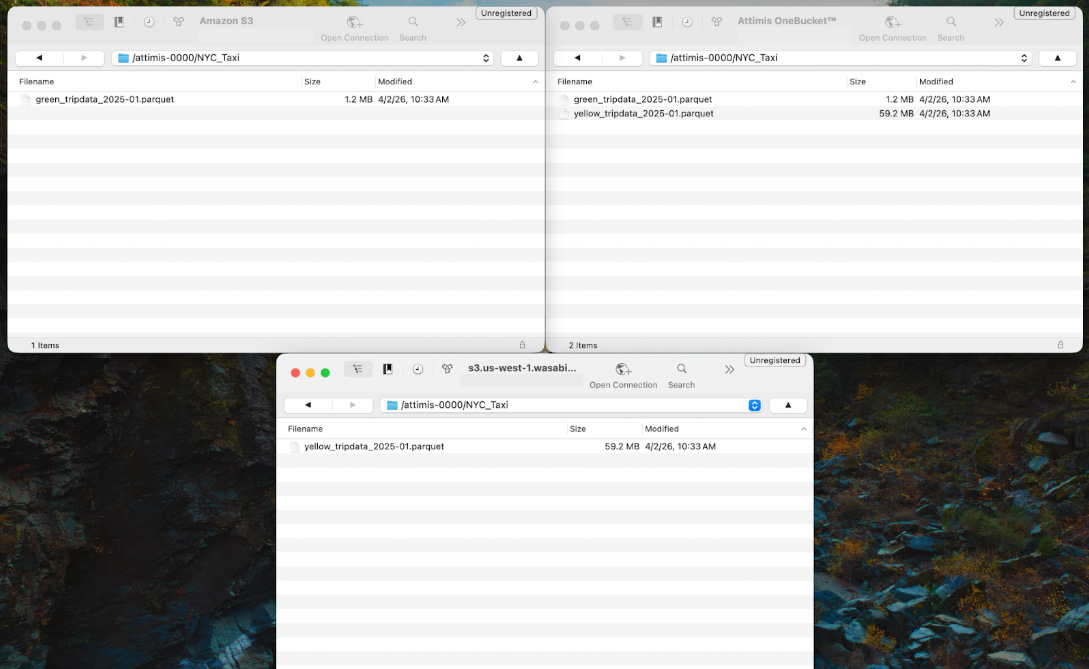
Within this bucket is a directory called NYC_Taxi, containing Parquet datasets from the public TLC Trip Record Data. Though the datasets appear within a single namespace, they may actually reside across multiple storage systems — for example, distributed across cloud storage or on-prem environments such as Wasabi. OneBucket abstracts these locations and presents them as unified storage to Databricks.
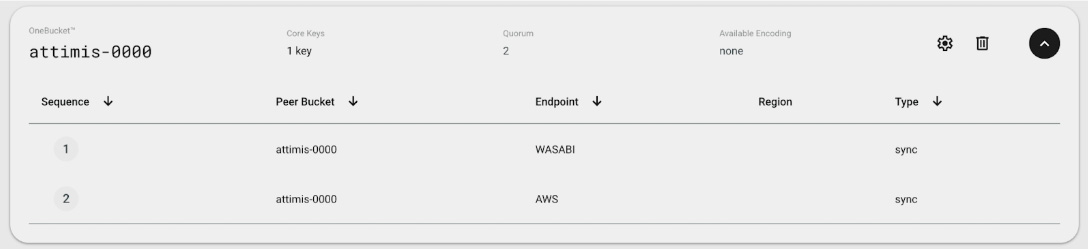
In the Attimis console, the bucket attimis-0000 is mapped to multiple storage endpoints. The compute layer only interacts with a single endpoint, while Attimis manages where the data is physically stored.
3. reading and writing data
We read two Parquet datasets from NYC_Taxi/ through the OneBucket endpoint, combine them into a single dataset, and write back to the unified storage layer as a Delta Lake table in NYC_Taxi_Delta/.
# Read taxi data into a dataframe
df_green = pd.read_parquet(io.BytesIO(client.get_object(BUCKET_NAME, "NYC_Taxi/green_tripdata_2025-01.parquet").read()))
df_yellow = pd.read_parquet(io.BytesIO(client.get_object(BUCKET_NAME, "NYC_Taxi/yellow_tripdata_2025-01.parquet").read()))

# Create a taxi_color column and merge the two datasets together
df_green["taxi_color"] = "green"
df_yellow["taxi_color"] = "yellow"
df_combined = pd.concat([df_green, df_yellow], ignore_index=True)
display(df_combined.head())

# Create a Delta Lake table from the combined dataframe
write_deltalake(
    f"s3://{BUCKET_NAME}/NYC_Taxi_Delta/",
    df_combined,
    mode="overwrite",
    storage_options={
        "AWS_ACCESS_KEY_ID": ACCESS_KEY,
        "AWS_SECRET_ACCESS_KEY": SECRET_KEY,
        "AWS_ENDPOINT_URL": f"https://{ENDPOINT}"})
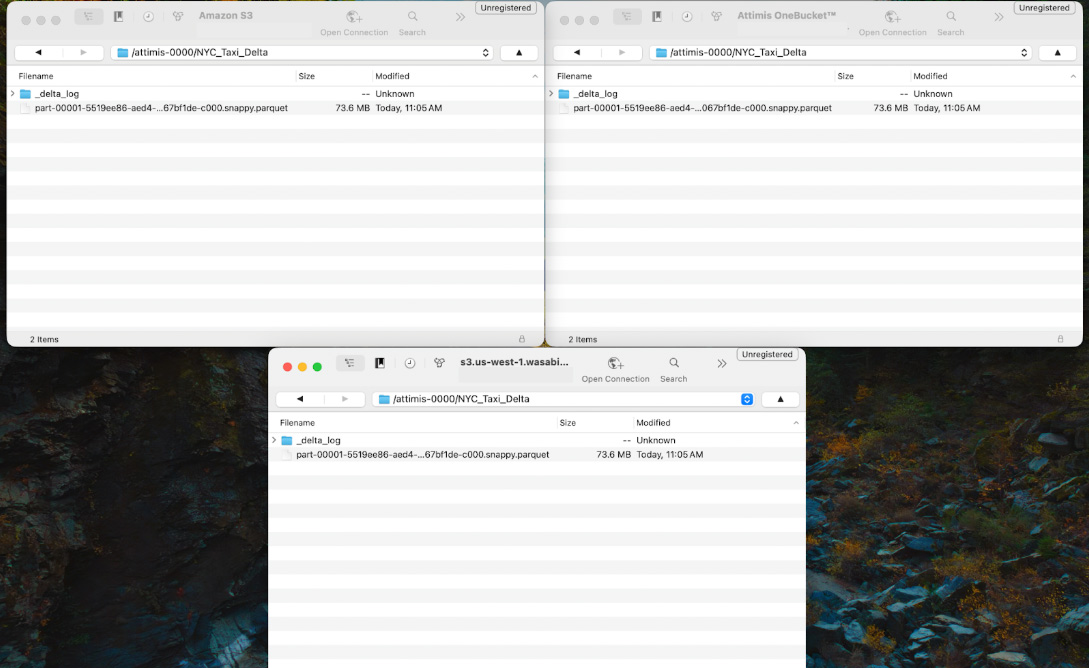
Because OneBucket is configured to write to multiple storage endpoints, the Delta table is automatically written to each location. Here the NYC_Taxi_Delta/ dataset is replicated to both AWS and Wasabi while Databricks interacts with the single s3.attimis.cloud endpoint.
option 2: all-purpose cluster workflow (s3a)
For Databricks All-Purpose clusters where Spark is configured at the cluster level. OneBucket is configured directly in the Spark runtime using the S3A connector — once set, every notebook attached to the cluster can use the Attimis global endpoint.
1. cluster-level configuration
Add the following values to the Spark Config section of your cluster:
# Set spark configurations for Attimis OneBucket
spark.hadoop.fs.s3a.path.style.access true
spark.hadoop.fs.s3a.endpoint s3.attimis.cloud
spark.hadoop.fs.s3a.access.key NaN
spark.hadoop.fs.s3a.secret.key NaN
2. native spark operations
Read the public NYC Taxi datasets into Spark DataFrames:
green_df = spark.read.parquet("s3a://attimis-0000/NYC_Taxi/green_tripdata_2025-01.parquet")
yellow_df = spark.read.parquet("s3a://attimis-0000/NYC_Taxi/yellow_tripdata_2025-01.parquet")
Add a taxi_color column to each, then merge into one DataFrame:
green_df = green_df.withColumn("taxi_color", lit("green"))
yellow_df = yellow_df.withColumn("taxi_color", lit("yellow"))
df_combined = green_df.unionByName(yellow_df, allowMissingColumns=True)
Write the combined dataset back to the OneBucket endpoint:
df_combined.write.mode("overwrite").parquet("s3a://attimis-0000/NYC_Taxi_New") Because the cluster is connected to s3.attimis.cloud, Spark interacts with a single logical storage endpoint. In the background, Attimis policies determine where data is physically stored and can replicate it across AWS, Wasabi, or other cloud, on-prem, or edge systems.
why attimis onebucket for databricks?
OneBucket provides a unified S3-compatible data access layer so Databricks workloads interact with distributed object storage through a single endpoint. Because it exposes a standard S3 interface, it works from any environment that supports S3-compatible APIs — Serverless compute, All-Purpose Spark clusters, and other cloud applications.
unified storage access
All datasets appear within the same namespace regardless of where the data physically resides, letting analytics and data engineering workflows treat distributed storage as a single logical data lake.
storage flexibility
The interface stays consistent across environments, removing the complexity of managing multiple endpoints and credentials while maintaining consistent governance, accessibility, and scalability for modern analytics and AI workloads.